ASMR content continues to dominate short-form platforms such as YouTube Shorts, TikTok, Instagram Reels, and Facebook Reels. Among the most successful formats are satisfying fruit-cutting videos featuring glass, resin, jelly, clay, and bubble-wrap textures.
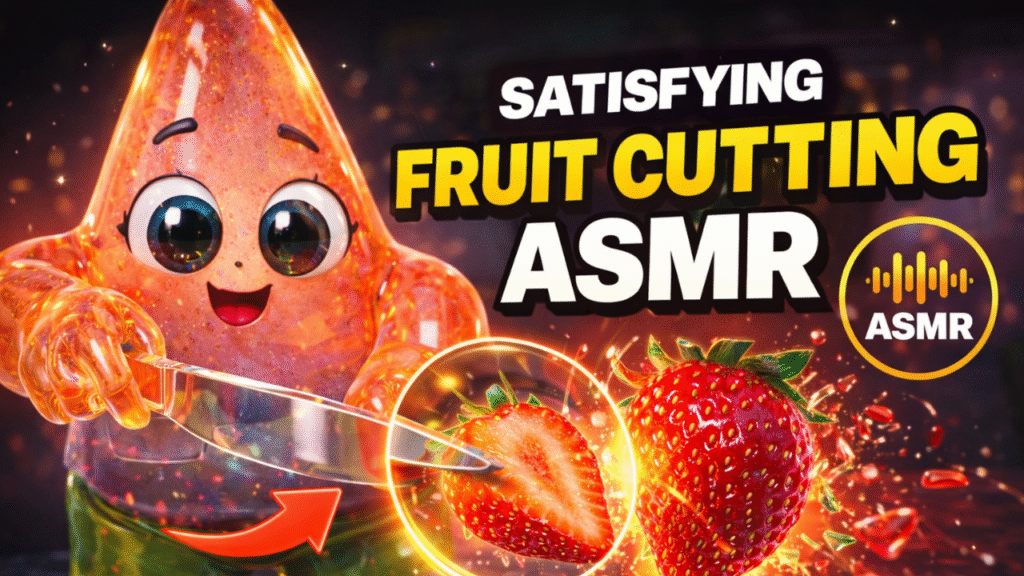
This collection contains 60 carefully crafted AI prompts divided into two major categories:
- Image Generation Prompts (1–25) – Create stunning base images using ChatGPT, Midjourney, Leonardo AI, or other image generators.
- Video Animation Prompts (26–60) – Animate those images using Runway, Luma AI, Grok AI, Kling, Pika, or similar video generation tools.
These prompts are designed to maximize visual satisfaction, rewatchability, and engagement.
Part 1: Image Generation Prompts (1–25)
Create high-quality base images before turning them into animated ASMR videos.
Glass & Resin Style (Most Viral Category)
1. Watermelon
A high-detail 3D render of a stylized cute bear character made of translucent polished glass, cutting a glossy resin watermelon on a wooden board. Bright cinematic lighting.
2. Strawberry
A 3D stylized anime chef made of crystal-clear glass, slicing a giant translucent jelly strawberry. Colorful resin accents, macro shot, pastel pink palette.
3. Mango
A miniature 3D toy character made of polished amber glass, slicing a glossy, semi-transparent mango into perfect cubes. Bright studio lighting, satisfying reflections.
4. Pineapple
A cute 3D robot character crafted from frosted glass, slicing a glowing glass pineapple on a dark sleek kitchen counter. Intense caustics, cinematic focus.
5. Grape
A stylized 3D glass bunny character using a razor-sharp crystal knife to slice a giant glossy purple jelly grape.
6. Kiwi
A 3D glass fox character slicing a translucent green kiwi fruit with neon-green seeds glowing inside. Hyper-realistic glass texture.
7. Dragon Fruit
A transparent glass dragon character cutting a vibrant pink-and-white resin dragon fruit. Macro focus on glossy textures.
8. Orange
A cute 3D glass cat slicing a bright neon-orange translucent resin orange. Frozen juice droplets and bright reflections.
9. Avocado
A polished glass panda character splitting a semi-transparent green resin avocado with a dark amber glass pit.
10. Peach
A beautiful 3D glass fairy character slicing a soft pink translucent jelly peach on a white marble tabletop.
Claymation & Toy Texture Style
11. Apple
A beautiful claymation-style 3D render of a cute panda in a chef hat slicing a soft-textured red apple.
12. Banana
A high-quality 3D designer toy character with a glossy ceramic texture chopping a bright yellow matte-finish banana into perfect rounds.
13. Pomegranate
A cute chibi-style fox with a polished plastic texture opening a matte-textured pomegranate filled with glowing red gem-like seeds.
14. Blueberry
A squishy claymation blue monster crushing giant soft matte blueberries on a pastel pink cutting board.
15. Lemon
A stylized vinyl toy character with a matte finish slicing a vibrant yellow clay lemon under soft studio lighting.
Cyberpunk & Neon Style
16. Neon Melon
A futuristic cyber-monk made of dark glass with neon circuits slicing a glowing holographic melon.
17. Laser Apple
A sleek metallic robot using a laser-edged glowing knife to cut a neon-blue translucent apple.
18. Synthwave Coconut
A glowing pink resin character cracking open a neon-purple glass coconut in a retro synthwave environment.
Whimsical Fantasy Style
19. Starfruit
A tiny crystal elf slicing a magical glowing yellow starfruit that emits soft sparkles.
20. Crystal Pear
A majestic glass deer gently slicing a golden crystal pear on a reflective frozen lake.
21. Rainbow Fruit
A cute cloud-like character slicing a magical rainbow-layered jelly fruit.
22. Galaxy Grapes
A cosmic astronaut toy slicing dark-blue grapes that contain miniature galaxies and stars.
23. Ruby Cherry
A miniature glass mouse cutting deep ruby-red glossy cherries.
24. Emerald Fig
A green glass chameleon slicing a translucent emerald fig on a dark stone background.
25. Papaya
A stylized tribal toy character cutting a glowing orange resin papaya filled with black obsidian-glass seeds.
Part 2: Video Animation Prompts (26–50)
Upload your generated image to Runway, Luma AI, Kling, Grok AI, Pika, or other AI video generators.
Slow & Smooth Cutting Motions
26. Ultra Slow-Mo
The character slowly cuts the fruit with a glass knife. Ultra close-up macro shot, slow-motion slices sliding apart.
27. Jelly Squish
The knife presses into a jelly fruit creating realistic deformation before slicing cleanly through.
28. Gliding Blade
Top-down camera view showing a crystal knife smoothly gliding through colorful fruit layers.
29. Rhythmic Chop
Clean and rhythmic chopping of resin fruit into thin slices.
30. Perfect Split
The knife cuts directly through the center and both halves slowly slide apart.
ASMR Sound Focus
31. Crisp Crunch Audio
Sharp and satisfying cutting sounds with macro camera focus.
32. Squishy Sound-Wave
Soft jelly fruit compression with juicy squish effects.
33. Scraping Sound
Fruit slices are smoothly scraped across a wooden board.
34. Clicky Dice
Fruit is diced into perfect cubes with satisfying clicking sounds.
35. Peeling Layer
A glossy peeler removes a continuous transparent peel ribbon.
Dynamic & Viral Effects
36. Juice Droplets
Slow-motion jelly droplets splash from the fruit during cutting.
37. Glowing Core
The fruit’s center glows brightly when exposed.
38. Seamless Loop
Continuous cutting motion designed for infinite looping videos.
39. Floating Slices
Fruit slices briefly float before landing softly.
40. Color Shift
Fruit colors smoothly transition as the knife cuts deeper.
Camera Movement Prompts
41. Macro Zoom
Camera zooms toward the knife edge breaking the fruit skin.
42. 360 Rotation
A slow orbital camera movement around the character.
43. First-Person POV
View from the character’s perspective while cutting.
44. Depth of Field
Sharp focus on the fruit while the character remains blurred.
45. Under-Table View
Creative camera angle from beneath a transparent table.
Creative Actions
46. Crushing
A heavy glass stamper crushes translucent berries.
47. Ice Crack
Frozen fruit develops satisfying fractures before splitting.
48. Slime Ooze
Glossy syrup slowly flows from the fruit center.
49. Layer Peel
Tweezers gently peel back translucent fruit layers.
50. Stacking
Fruit slices are stacked into a perfectly balanced tower.
Part 3: Bubble Wrap ASMR Prompts (51–60)
Bubble Wrap ASMR is currently one of the fastest-growing satisfying-content niches because the popping effect dramatically increases watch time and replay value.
Bubble Wrap Image Generation Prompts
51. Bubble Wrap Watermelon
A glass panda slicing a watermelon made entirely of translucent bubble wrap filled with colorful gel.
52. Bubble Wrap Mango
A resin toy character cutting a bright yellow bubble-wrap mango.
53. Bubble Wrap Strawberry
A chibi fox slicing a giant strawberry made from red translucent bubble-wrap material.
54. Full Bubble Wrap Character
A designer toy character made entirely of glossy bubble wrap popping grape-shaped bubbles.
55. Pineapple Bubble Wrap
A cute bear cutting a pineapple covered in thick yellow bubble-wrap pockets.
Bubble Wrap Video Animation Prompts
56. The Perfect Pop Slice
Each bubble pops one-by-one in ultra slow motion as the knife cuts through.
57. Rhythmic Slicing & Popping
Rapid bubble bursts release tiny drops of glossy gel.
58. Finger Press Popping
Close-up hand movements popping individual bubbles.
59. Squishy Plastic Physics
Realistic plastic deformation before the bubbles burst.
60. Under-Table Pop View
A camera angle from below a glass table showing bubbles popping against the surface.
Pro Video Editing Tip
The success of Bubble Wrap ASMR videos largely depends on sound design. Always add clean and high-quality sound effects such as:
- Plastic Bubble Wrap Popping
- Crisp Packaging Pop
- Soft Jelly Squish
- Crystal Glass Slice
- Satisfying Click Sounds
Combining realistic sound effects with macro close-up visuals can significantly improve viewer retention, watch time, and overall viral potential.
Conclusion
These 60 AI prompts provide a complete workflow for creating viral ASMR content. Start by generating high-quality images, animate them with realistic motion, add satisfying sound effects, and optimize for short-form video platforms.
Whether you use ChatGPT, Midjourney, Leonardo AI, Runway, Luma AI, Kling, Pika, or Grok AI, these prompts can help you create highly engaging ASMR videos that stand out in today’s competitive content landscape.
AI tools now make it possible to create high-quality animated ASMR videos without advanced editing skills. You can generate a stylized cartoon character, design a glossy food scene, and turn it into a motion ASMR cutting video with sound effects — all using prompts.
Want to Learn AI Tools? Join my complete course [Click Below Link]
Bundle of 20 AI tools to increase your Productivity and income