Have you seen those dreamy, cinematic AI videos going viral on Instagram and other social media platforms?
The good news is that you don’t need professional video-editing skills or complicated editing software to create this type of content.
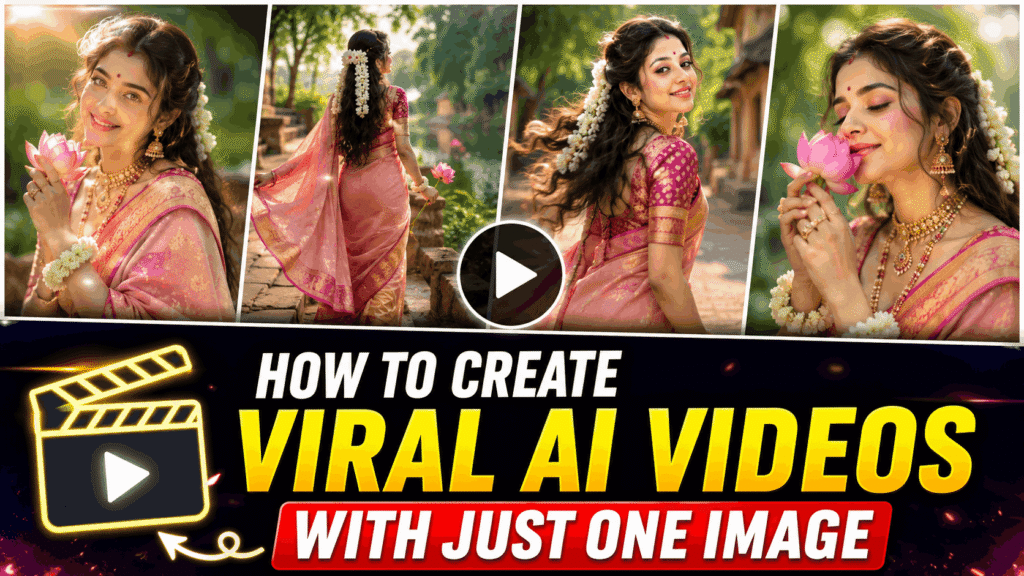
With the Google Flow app, you can create cinematic AI videos directly from your phone using an image and a detailed video prompt. Google Flow is an AI creative studio designed for creating and refining images and videos using Google’s generative AI models.
In this tutorial, we will create a beautiful dreamy traditional fashion film featuring a Bengali-inspired look, a peach-pink saree, jasmine flowers, a pink lotus, a peaceful lake and a village setting.
The complete video will be divided into five 10-second scenes, with each scene generated separately.
What You Need
Before starting, keep these things ready:
- A smartphone
- Google Flow app
- A Google Account
- One suitable reference image
- The video prompts provided in this article
- An internet connection
Google Flow currently offers free access with daily credits, while paid Google AI plans can provide additional credits and features. Availability, models, limits and features can vary by subscription, platform and region.
Step 1: Download and Open Google Flow
First, open the Google Play Store on your Android phone.
Search for:
Google Flow
Install the official Google Flow app and open it.
You can also check the official Google Flow listing on Google Play:
Google Flow – AI Creative Studio
Once the app is installed, sign in with your Google Account.
Tip: Always make sure you are downloading the official Google Flow application published by Google.
Step 2: Create a New Project
After opening Google Flow, start a New Project.
This project will be used to create your cinematic video.
The basic workflow is very simple:
New Project → Upload Image → Add Video Prompt → Generate
Google Flow supports creating videos using reference images, allowing you to guide the visual appearance of the generated video.
Step 3: Upload Your Reference Image
Now upload the image you want to use as your character/reference.
For this particular video, use an image that matches the traditional fashion look you want to create.
The image should ideally have:
- A clear face
- Good lighting
- Visible clothing
- Good image quality
- A suitable composition for your desired video
Important
Since we are creating five different scenes with the same character, try to use the same reference image and the same character description throughout the project.
This can help maintain visual consistency between scenes.
Step 4: Add the Video Prompt
Now comes the most important part.
Paste your video prompt into the prompt box and generate the scene.
You don’t need to write a completely new character description from scratch every time. The five prompts below are designed as a continuous cinematic sequence.
Each scene is approximately 10 seconds long.
Scene 1 — The Dreamy Introduction
Duration: 10 seconds
Mood: Soft, elegant and dreamy
Location: Mirror-calm lake
This first scene introduces the character and establishes the visual style of the entire film.
Video Prompt
A vertical (9:16) dreamy traditional-aesthetic fashion film. Landscape footage is rotated 90° in the vertical canvas. A Bengali-style beauty in a peach-pink saree spends a soft sun-washed afternoon by a mirror-calm lake. Pastel pink-and-green grade, slow-motion, shallow depth of field. No dialogue. No watermark.

Subject Styling:
Sheer peach/blush-pink saree with magenta + gold zari border and woven gold motifs. Bright magenta patterned blouse. Pearl-gold choker + long chain with large ornate gold pendant with pink/green stones. Jhumkas with multi-chain ear attachments, floral gold ring. White jasmine-flower bracelets on both wrists. Long wavy dark hair, half-up with a long white jasmine gajra. Pink shimmer eyeshadow, winged liner, magenta matte lips, tiny red bindi. Alta on fingertips, pink nails. Holding a pink lotus.

Setting:
Lake/pond with glassy tree reflections, stone steps/embankment with green creepers, soft overcast-white sky with warm sun flares, creamy green bokeh.

Shot Breakdown:
[0:00–0:04] From soft darkness she emerges, leaning toward the camera with a warm smile. Saree pallu flows gently. Leaf-bokeh backdrop. Soft sun flare.

[0:04–0:07] Beauty macros: profile with hand raised, jasmine gajra glowing. Then upright extreme close-up of her face — downcast lashes, pink shimmer eyeshadow, magenta lips, leaf in foreground.

[0:07–0:10] She holds the pink lotus near her face with eyes closed, a peaceful expression. Soft pastel light and creamy green bokeh.

Style:
Pastel blush-pink + spring-green palette, filmic softness, shallow depth of field, gentle sun flares. No watermark.
Scene 2 — A Walk by the Lake
Duration: 10 seconds
Mood: Graceful and peaceful
Location: Stone embankment beside the lake
The second scene continues directly from Scene 1, so keep the same character and styling.
Video Prompt
Continuation of the dreamy traditional fashion film by the lake. Same exact character, same pastel pink-and-green grade, rotated 90° framing. No dialogue. No watermark.

Subject Styling:
Same exact styling as Scene 1: peach-pink saree with magenta-gold zari, magenta blouse, full gold jewelry, jasmine gajra, alta on fingertips, pink lotus.

Setting:
Stone embankment by the mirror-calm lake, lush green creepers, soft sun flares, creamy green bokeh.

Shot Breakdown:
[0:00–0:04] Wide shot: She walks gracefully along the stone lake-steps. Saree trails behind her. Water mirrors the trees perfectly. Soft warm light.

[0:04–0:07] Rear view as she walks. The long white jasmine gajra sways gently with her movement. Soft breeze moves the saree pallu.

[0:07–0:10] She turns slightly on the steps, still holding the lotus, looking peaceful. Creamy green bokeh and gentle sun flare in the background.

Style:
Same pastel grade, slow elegant movement, shallow depth of field, no watermark.
Scene 3 — The Joyful Village Run
Duration: 10 seconds
Mood: Happy, energetic and cinematic
Location: Sunlit village lane
Now we change the environment while keeping the character’s appearance consistent.
Video Prompt
Continuation of the cinematic traditional fashion film. The same character and aesthetic. She runs joyfully down a village lane and then glances back. Rotated 90° framing. No dialogue. No watermark.

Subject Styling:
Same exact styling: peach-pink saree, magenta blouse, gold jewelry, jasmine gajra, alta-tipped fingers.

Setting:
Sunlit village lane with palm trees, old walls and greenery. Soft overcast light with warm flares.

Shot Breakdown:
[0:00–0:04] She runs laughing toward the camera down the sunlit village lane, holding her saree pleats. Palms and walls are softly blurred. Joyful energy.

[0:04–0:07] Close rear shot focusing on the long white jasmine gajra as she moves.

[0:07–0:10] On the stone steps she turns over her shoulder and smiles softly at the camera. Warm light catches her jewelry and gajra.

Style:
Same pastel pink-and-green grade, soft motion, gentle flares, no watermark.
Scene 4 — Jewelry & Beauty Close-Ups
Duration: 10 seconds
Mood: Luxurious, intimate and elegant
Focus: Face, jewellery and saree details
This scene is designed to give the video a more premium fashion-film feel by focusing on tiny details.
Video Prompt
Continuation of the dreamy traditional fashion film. Focus on jewelry details, lotus and intimate face close-ups. Same dreamy traditional look. Rotated 90° framing. No dialogue. No watermark.

Subject Styling:
Same exact styling: peach-pink saree, magenta blouse, full gold jewelry set, jasmine gajra, alta on fingertips, pink lotus.

Shot Breakdown:
[0:00–0:04] Torso and mid close-ups: magenta blouse, large gold pendant, floral gold ring and white jasmine bracelets are clearly visible. She poses with fingers near her hair, shy downcast eyes.

[0:04–0:07] Extreme face close-ups: eyes closed, then slowly opening. A blurred pink lotus petal softens the edge of the frame. Bindi, choker and pendant gleam in the soft light.

[0:07–0:10] Backlit wide shot: She stands on the embankment against a strong sun flare. The saree becomes translucent and glowing. Lake and green foliage surround her.

Style:
Same pastel grade, strong focus on jewelry and face details, soft flares, no watermark.
Scene 5 — The Final Lotus Moment
Duration: 10 seconds
Mood: Soft, emotional and dreamy
Focus: Lotus + face + final expression
The final scene works as the closing shot of the cinematic sequence.
Video Prompt
Final reverie sequence. She interacts intimately with the pink lotus in soft, dreamy close-ups. Same aesthetic. Rotated 90° framing. No dialogue. No watermark.

Subject Styling:
Same exact styling: peach-pink saree, magenta blouse, gold jewelry, jasmine gajra, alta-tipped fingers, pink lotus.

Shot Breakdown:
[0:00–0:03] Top-down macro: Her alta-tipped fingers and floral gold ring gently cradle the pink lotus resting on her saree pleats. Jasmine bracelets frame her wrists.

[0:03–0:07] She lifts the lotus to her nose, closes her eyes and inhales softly, a gentle smile appearing. Head tilts slightly. Gold chains and jhumka chains catch the light.

[0:07–0:10] Soft dreamy close-ups: She opens her eyes slowly, gazes upward with a peaceful expression, then gives a final soft smile. Creamy green-white bokeh and gentle sun flares surround her face.

Style:
Same pastel blush-pink + spring-green grade, shallow depth of field, tactile and intimate mood, no watermark.
Step 5: Generate All Five Clips
Now repeat the same process for every scene.
Your workflow will be:
Scene 1 → Upload Reference Image → Paste Prompt → Generate
Scene 2 → Use the Same Reference/Character → Paste Prompt → Generate
Scene 3 → Use the Same Reference/Character → Paste Prompt → Generate
Scene 4 → Use the Same Reference/Character → Paste Prompt → Generate
Scene 5 → Use the Same Reference/Character → Paste Prompt → Generate
You will end up with five individual cinematic clips of approximately 10 seconds each.
Google Flow currently supports image-to-video workflows and additional tools for working with generated visual content.
Step 6: Combine the Videos and Add Your Favorite Music
Once all five AI-generated video clips are ready, import them into any video-editing tool of your choice.
Arrange the clips in the correct order:
Scene 1 → Scene 2 → Scene 3 → Scene 4 → Scene 5
Render or export the combined video in 9:16 vertical format to keep it suitable for Instagram Reels, YouTube Shorts and other short-form video platforms.
Finally, add your favorite music or a suitable trending audio track to match the mood of your cinematic video.
Adjust the music timing if needed, preview the complete video, and export the final version.
And that’s it — your cinematic AI video is ready to share!
How to Keep the Same Character in Every Scene
One of the biggest challenges with AI-generated videos is maintaining character consistency.
To get better results:
Use the same reference image
Whenever possible, use the same reference image for every scene.
Keep the styling identical
Repeat important details such as:
- Peach-pink saree
- Magenta blouse
- Gold jewellery
- White jasmine gajra
- Pink lotus
- Alta-tipped fingers
- Long wavy dark hair
Keep the visual style consistent
Use the same:
- Pastel pink-and-green color palette
- Cinematic lighting
- Shallow depth of field
- Soft sun flares
- Dreamy atmosphere
This makes all five clips feel like parts of the same film.
How to Make the Final Cinematic Video
Once all five scenes have been generated, arrange them in this order:
Scene 1 → Scene 2 → Scene 3 → Scene 4 → Scene 5
Together, these scenes create a complete cinematic sequence.
Google Flow also provides tools for refining and editing generated visual content, including video-to-video editing and Scenebuilder, depending on the features available to your account.
You can then use the final video for platforms such as Instagram Reels, YouTube Shorts or other vertical-video platforms.
Tips for Better AI Cinematic Videos
1. Use detailed prompts
Don’t simply write:
“Make a cinematic video of a woman.”
Instead, describe the character, clothes, location, lighting, camera movement, mood and action.
2. Describe the camera movement
Words such as:
wide shot, close-up, macro shot, rear shot, top-down shot, slow motion, shallow depth of field
can help communicate the intended visual direction.
3. Keep actions simple
AI video generation often works better when the character performs natural, controlled movements rather than extremely complicated actions.
4. Create short scenes
Instead of trying to generate an entire film in one prompt, create multiple short scenes.
This gives you more control over the story and visual progression.
5. Maintain continuity
The most important thing is to keep the character, outfit, colour palette and overall aesthetic consistent across all scenes.
Final Result
And that’s it!
You don’t need to be a professional video editor to create this type of cinematic AI content.
With a good reference image, a detailed prompt and Google Flow, you can create individual cinematic scenes and turn them into a complete visual story.
For this example, our five-scene story follows this journey:
Scene 1: Dreamy introduction by the lake
Scene 2: Graceful walk beside the water
Scene 3: Joyful run through the village
Scene 4: Jewellery and beauty close-ups
Scene 5: Peaceful lotus finale
The result is a dreamy, traditional and cinematic fashion film created primarily through AI.
Try Google Flow and experiment with your own characters, locations, outfits and cinematic concepts.