Creating a Holi reel where you appear to celebrate with Lord Krishna is no longer limited to high-end production setups. With the right prompts and structured workflow, you can generate cinematic visuals and convert them into a smooth video — completely through AI.
In this article, I’ll explain the exact process I followed — from image creation to motion generation, editing, and face correction.
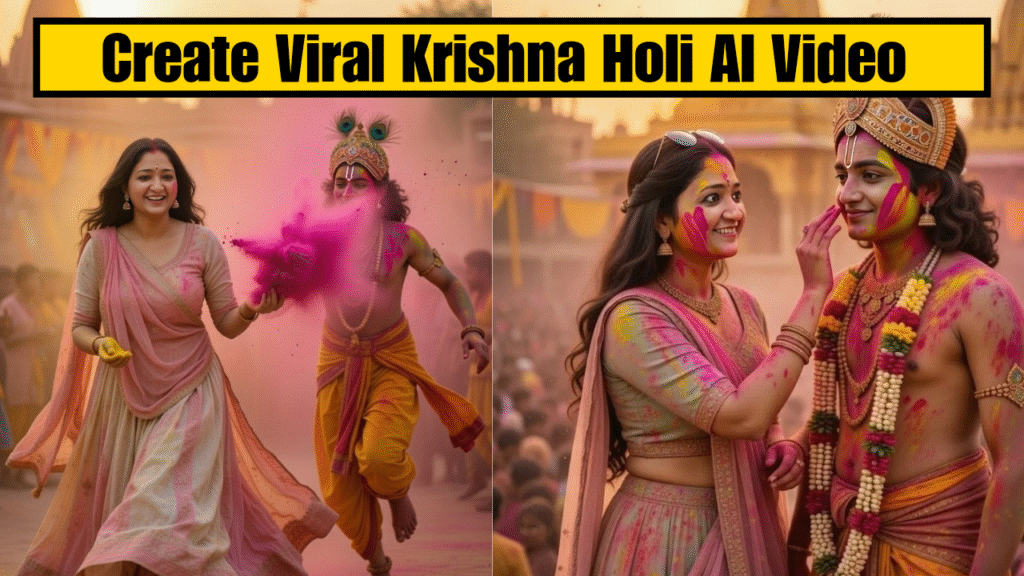
This workflow uses Grok for image generation and Veo 3.1 for converting images into video.
Everything can be started with free options available on these platforms.
Step 1: Create High-Quality Holi Images in Grok
Your video quality depends heavily on your images. If your images look flat, your video will look flat. So don’t rush this step.
How to Generate Images
- 1. Open Grok
- 2. Select the “Imagine” option
- 3. Upload your reference image (this ensures face consistency and realism)
- 4. Paste your Holi-themed image prompt
- 5. Generate the image
Now here’s where most people go wrong — they generate one image and move to video.
Don’t.
You need multiple cinematic frames that feel like a sequence, not random screenshots.
Create at least 5 different images using different prompts.
Scene Structure for Image Creation
Below is the format you can use inside your article. Add your own prompts in the spaces provided.
Scene 1 (Hand Holding)
Image Prompt (Grok):
Ultra-realistic cinematic POV shot, first person perspective of a young female devotee, Lord Krishna holding the viewer’s feminine hand and gently pulling forward through vibrant Holi celebration in Vrindavan, only Krishna’s shoulder, arm and hand visible, viewer’s hand clearly feminine with slim wrist, soft natural nails, subtle bangles and light mehndi traces, realistic skin texture, Krishna wearing yellow dhoti, peacock feather crown slightly visible from side angle, soft divine blue glow, vibrant gulal powder floating in air, warm golden sunset lighting, temple silhouettes in background, cinematic depth of field, realistic hand grip connection, dynamic color particles frozen mid-air, 4K ultra-detailed textures, epic festive atmosphere, vertical 9:16
Scene 2 (Colour Splash)
Image Prompt (Grok):
Ultra-realistic cinematic Holi celebration in Vrindavan at golden sunset, same temple silhouette and blurred festive crowd in background, vibrant gulal powder floating in air, female devotee fully visible in foreground smiling joyfully, wearing pastel lehenga covered in pink and yellow colors, sharp detailed face clearly visible, natural feminine posture, actively throwing pink color toward Krishna, Krishna full body visible wearing yellow dhoti and peacock feather crown, Krishna positioned with back facing camera, face completely hidden and not visible, no front face, no side face, only back view of head and body, natural dynamic Holi motion, both playing with colors energetically, realistic powder physics, warm golden cinematic lighting, shallow depth of field, seamless continuation frame from previous POV scene, ultra detailed textures, 4K, vertical 9:16
Scene 3 (Girl Apply Color to Krishna)
Image Prompt (Grok):
Ultra-realistic cinematic close Holi scene in Vrindavan during golden sunset, Lord Krishna gently applying pink gulal to female devotee’s cheek, both faces clearly visible with soft joyful expressions, Krishna wearing yellow dhoti and peacock feather crown, divine blue skin glow subtle and natural, female devotee smiling with emotional devotion, pastel lehenga lightly covered in colors, warm golden lighting, shallow depth of field, temple background softly blurred, gentle color particles floating in air, realistic skin texture and hand interaction, cinematic devotional atmosphere, 4K ultra detailed, vertical 9:16
Scene 4 (Playful Holi Chase)
Image Prompt (Grok):
Ultra-realistic cinematic Holi action shot in Vrindavan at golden sunset, Lord Krishna and female devotee throwing vibrant pink and yellow gulal directly toward camera, both faces clearly visible laughing joyfully, Krishna wearing yellow dhoti and peacock feather crown, pastel lehenga flowing naturally, massive powder explosion frozen mid-air, realistic motion physics, temple silhouettes and blurred festive crowd in background, warm dramatic lighting, dynamic composition, ultra detailed textures, 4K quality, vertical 9:16
Scene 5 (Running & Playful Color Throw)
Image Prompt (Grok):
Ultra-realistic cinematic Holi chase scene in Vrindavan at golden sunset, vibrant gulal powder filling the air, temple silhouettes and festive crowd softly blurred in background, Lord Krishna running playfully slightly ahead while turning his upper body sideways, full body visible wearing yellow dhoti and peacock feather crown, face partially turned away and not fully visible, throwing bright pink gulal backward toward female devotee, massive powder explosion mid-air, female devotee laughing and slightly leaning away while holding yellow color in hand, pastel lehenga flowing dynamically with motion, realistic fabric and hair movement, cinematic motion blur on lower legs only, warm golden lighting, energetic joyful atmosphere, ultra detailed textures, no text, no watermark, 4K quality, vertical 9:16
Once all images are generated, download them in high resolution.
Step 2: Convert Images into Motion Using Veo 3.1
Now we turn still frames into cinematic video clips.
How to Create Video Clips
- 1. Open Veo 3.1
- 2. Click New Project
- 3. Select Frame to Video
- 4. Upload your first generated image
- 5. Add a Video Motion Prompt
- 6. Generate the clip
This step is crucial.
If you skip writing a proper video motion prompt, the AI will randomly animate the image — and the result may look unnatural.
You must guide the movement.
Scene-by-Scene Video Structure
For every image, you will now add a separate motion prompt.
Scene 1
Video Motion Prompt (Used in Veo 3.1): (Add your first image)
Single continuous cinematic slow motion shot in Vrindavan during Holi at golden sunset, first person POV of a feminine devotee holding Lord Krishna’s hand, camera positioned naturally as body-mounted perspective, only Krishna’s shoulder, arm and back visible, peacock feather crown visible from behind, yellow dhoti flowing naturally in soft wind, vibrant gulal powder floating in air, blurred festive crowd in background, temple silhouettes glowing in warm sunlight, slow motion walking through light color mist, realistic hand grip, soft powder particles hitting camera lens slightly, natural human movement, cinematic depth of field, ultra realistic textures, warm golden lighting, peaceful devotional mood, no cuts, no jumps, smooth steady motion, 4K cinematic quality, vertical 9:16
Scene 2
Video Motion Prompt (Used in Veo 3.1): (Add second image)
Single continuous cinematic Holi celebration scene in Vrindavan at golden sunset, female devotee clearly visible smiling brightly, wearing pastel lehenga covered in pink and yellow gulal, Lord Krishna full body visible wearing yellow dhoti and peacock feather crown, Krishna positioned with back facing camera and face completely hidden, both actively throwing vibrant pink and yellow color at each other, energetic natural body movement, realistic powder explosion in slow motion, festive blurred crowd and temple background consistent, warm cinematic lighting, ultra detailed textures, natural fabric movement, playful joyful expressions, smooth steady camera motion slightly circling them, no cuts, no flicker, seamless realistic physics, 4K vertical 9:16
Scene 3
Video Motion Prompt (Used in Veo 3.1): (Add third image prompt)
Single continuous cinematic Holi scene in Vrindavan during golden sunset, soft devotional atmosphere, female devotee clearly visible in foreground smiling gently, applying pink gulal softly to Lord Krishna’s cheek, Krishna body fully visible wearing yellow dhoti and peacock feather crown, Krishna slightly turned sideways with face partially hidden and not fully facing camera, warm divine glow around them, light gulal particles floating gently in air, blurred festive crowd and temple silhouette in background, natural slow motion movement, realistic hand interaction and skin texture, cinematic depth of field, emotional serene moment, smooth stable camera, no cuts, no jump transitions, ultra realistic 4K quality, vertical 9:16
Scene 4
Video Motion Prompt (Used in Veo 3.1): (Add fourth image)
Create a cinematic slow-motion Holi festival video based on the given reference image. Keep the same girl’s face, same pastel peach and mint lehenga, same jewelry, same expression, and same temple street background at golden sunset. The male character dressed as Krishna remains behind her with peacock crown and yellow dhoti.
Start with the girl gently spinning in slow motion, her lehenga flowing wide in circular motion. Pink and yellow gulal burst upward in the air above them, particles floating realistically in sunlight. Camera starts with a medium front shot, slowly pushing in with shallow depth of field.
Add natural fabric movement, soft wind in her hair, realistic powder physics, warm golden lighting, cinematic 4K quality, 60fps slow motion effect. Background dancers slightly blurred with subtle movement. Keep expressions joyful and divine. No face change, no outfit change, no extra characters added.”
Scene 5
Video Motion Prompt (Used in Veo 3.1): (Add fifth image)
Generate a dynamic cinematic Holi celebration video from the provided reference image. Keep the exact same woman’s face, same pink and cream outfit, same hairstyle, same jewelry, and same Krishna character behind her. Same temple street and sunset lighting.
Scene begins with the girl running forward smiling, holding yellow color in one hand. Krishna runs playfully behind her and throws pink gulal in slow motion toward the camera. Add realistic color powder explosion effect, particles moving naturally in air. Camera tracks backward smoothly as they run forward.
Add natural foot movement on dusty ground, light color mist in atmosphere, cinematic golden glow, 4K ultra-realistic, high detail, soft background blur. Keep everything consistent with the reference image. No face distortion, no costume change, no random crowd focus.”
Repeat this process for each image.
You will now have multiple short video clips.
Step 3: Merge All Clips in a Video Editing Tool
Once all clips are generated:
- 1. Download all video clips
- 2. Open any video editing software
- 3. Import all clips
- 4. Arrange them in sequence
- 5. Add background music
- 6. Add smooth transitions
- 7. Export final video
Now your Holi reel is complete.
What If the Face Doesn’t Match Properly?
Let’s be practical.
AI sometimes struggles with face consistency. Expressions may change slightly or facial structure may look off.
For Images
After generating the image:
- Use a face swap tool
- Upload your original reference image
- Replace the AI-generated face
- Download corrected image
For Videos
If the face looks inconsistent in motion:
- Use a video face swap tool
- Upload generated video
- Upload your reference image
- Process and download corrected video
Most tools offer free starting options, so the full workflow can be done without heavy investment.
Important Creative Advice
Don’t think like someone “testing AI.”
Think like a director.
Your reel should feel like:
- Entry
- Interaction
- Emotional build
- Peak celebration
- Grand finish
When you structure it like a story, your content looks premium — even if it’s fully AI-generated.
Conclusion
Creating a cinematic Holi reel with Lord Krishna using AI is not complicated — but it requires clarity and structure.
By:
- Generating multiple high-quality images in Grok
- Converting them into motion using Veo 3.1
- Writing strong motion prompts
- Merging clips professionally
- Fixing face inconsistencies if needed
You can create a visually powerful Holi video entirely through prompts.
The tools are accessible. The difference in quality comes from how intentionally you use them.
Now refine your prompts, think in sequences, and create something that actually looks cinematic — not random AI output.
Want to Learn AI Tools? Join my complete course [Click Below Link] Bundle of 20 AI tools to increase your Productivity and income