Creating cinematic AI reels is no longer just about adding random effects. The real goal is making the video feel natural, realistic, and movie-like while keeping the creator’s original movement and expressions untouched.
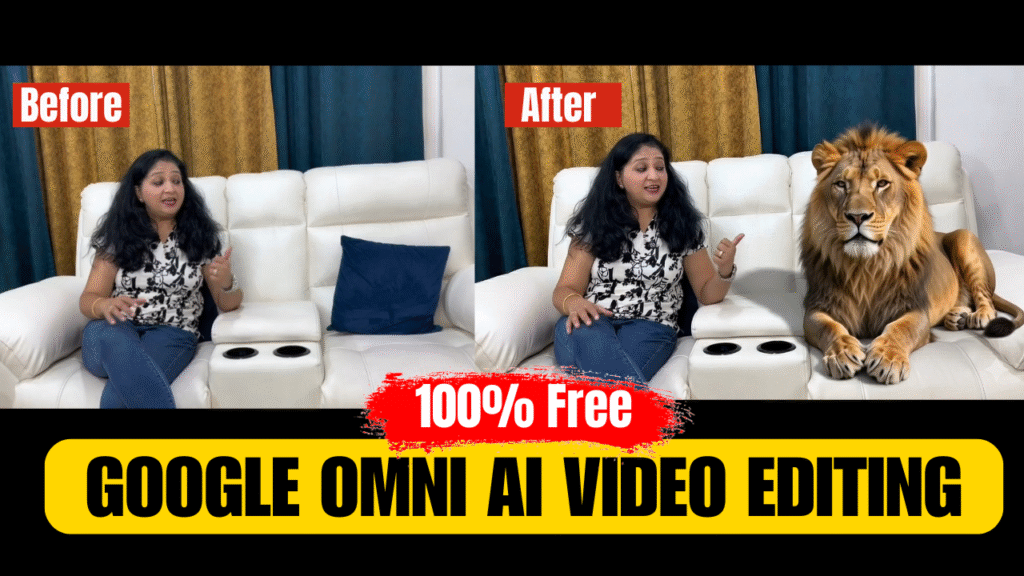
In this project, we used Google Omni to create a high-quality cinematic reel with realistic AI scenes like:
- Realistic Lion Scene
- Flying Eagle Scene
- Dubai Skyline Background
- Luxury Beach Scene
- Royal Rich Sofa Look + YouTube Thumbnail Ending
The most important thing in this workflow was:
“Do not change the original human motion.”
Instead of generating one full AI video, the reel was divided into multiple parts for better realism and smoother AI generation.
Full Process Using Google Omni
Step 1 — Record Your Raw Video
First, record your normal talking video naturally.
Important Tips:
- Keep lighting clean and stable
- Use natural body movement
- Avoid fast camera shakes
- Talk normally like a vlog
- Leave proper pauses for cinematic moments
The better the raw video looks, the more realistic the final AI output becomes.
Step 2 — Divide the Video into 5 Sections
Instead of generating everything together, divide the video into separate scenes.
We divided this project into 5 cinematic sections:
1️⃣ Lion Scene
2️⃣ Eagle Scene
3️⃣ Dubai Background Scene
4️⃣ Beach Scene
5️⃣ Royal Sofa + YouTube Thumbnail Ending
This helps Google Omni understand each effect properly and prevents fake-looking transitions.
Step 3 — Open Google Omni
Now open Google Omni.
Select:
- Ratio → 16:9
- High Quality Mode
- Cinematic Style
Then upload only the first video section.
After uploading:
- Paste the first scene prompt
- Click Generate
The AI will create that scene separately.
Repeat the same process for every section one by one.
1️⃣ Lion Scene Prompt
The creator is sitting casually on a sofa talking naturally to the camera in the original room with original lighting and original camera movement unchanged. A real adult lion is calmly sitting beside him like a luxury photoshoot animal companion. The lion should look completely photorealistic like real wildlife documentary footage, with natural fur texture, realistic muscle movement, authentic lion face proportions, subtle breathing, and natural blinking eyes.
Do not create a CGI lion, cartoon lion, fantasy lion, statue lion, or artificial-looking animal. The lion must match the real camera quality, real lighting direction, real shadows, and original environment of the video exactly. The creator casually points toward the lion while continuing his dialogue naturally without changing expressions.
No dramatic cinematic effects, no fake transitions, no glowing aura. Realistic movie-scene integration, seamless natural composition, hyper realistic wildlife quality, documentary-style realism.
2️⃣ Eagle Scene Prompt
Keep the original video completely unchanged including the creator’s body movement, facial expressions, talking style, timing, hand motion, and camera movement. Do not alter or freeze the original gestures.
The exact moment the creator raises his finger upward, a single realistic eagle should smoothly fly into the frame from the RIGHT side toward the fingertip direction. The eagle should naturally land on the creator’s shoulder for around 2 seconds while the creator continues talking normally with original reactions unchanged.
After staying briefly on the shoulder, the eagle should naturally fly away toward the LEFT side of the frame. The eagle movement must feel realistic with natural wing motion, realistic shadows, proper perspective, and seamless lighting matching the original video.
No magical effects, no glowing particles, no fake cinematic transitions, and no exaggerated animation. Keep the original video natural and realistic like a real movie shot.
3️⃣ Dubai Scene Prompt
The creator is talking naturally to the camera in the original room with original body movement and original facial reactions unchanged. When he gestures backward with his hand while mentioning the background behind him, only the background outside and behind him smoothly changes into a luxury Dubai skyline at night with Burj Khalifa and premium skyscraper lights visible realistically. The transformation should feel natural and cinematic, not animated or fake. No changes to the creator’s clothes, face, body movement, expressions, or camera angle. Keep the original video reactions exactly the same. Realistic lighting adaptation, seamless environment replacement, cinematic Dubai atmosphere, ultra realistic visuals, natural shadows, high quality movie-like background integration.
4️⃣ Beach Scene Prompt
The creator keeps the original body movement, original facial expressions, and original camera framing exactly the same. When he places his foot on the table while talking, only the background behind him naturally changes into a realistic luxury beach location with ocean waves, sunset lighting, and large cinematic rocks near the shore. The transition should feel like a real background replacement, not a zoom-out transformation or animated scene change. Keep the creator’s face and body completely unchanged. His clothes should only slightly adapt into relaxed luxury beach fashion while maintaining the same body shape and realistic appearance from the original video. No character redesign, no face change, no dramatic outfit transformation. Natural wind movement, realistic shadows, cinematic beach atmosphere, seamless movie-like background integration, ultra realistic visuals.
5️⃣ Royal Sofa + Thumbnail Ending Prompt
Keep the original video completely unchanged including the creator’s face, body movement, expressions, talking style, timing, and camera motion.
The exact instant the creator sits on the sofa, immediately in that same frame the sofa gets a soft luxury royal texture and detailing, his clothes become slightly rich king-style, and the background lighting becomes elegant mahal-style. The scene must NOT slowly transform and must NOT animate.
No delay, no transition, no morphing, no zoom-out, no cinematic effect, and no scene replacement.
At the ending moment when the creator says “YouTube par search karo Talk Money With Pavan,” a large realistic screen should naturally appear behind him in the background, as if it is part of the real room setup. On that screen, show the provided thumbnail image clearly and professionally like a real YouTube display screen.
At the same time, clean cinematic text should appear on the screen saying:
“Talk Money With Pavan”
The thumbnail and text should remain stable on the background screen while the creator continues his original movement naturally.
Ultra realistic screen integration, seamless perspective tracking, realistic cinematic quality.
Final Editing
After generating all 5 scenes:
- Import all clips into CapCut or Premiere Pro
- Arrange them in sequence
- Add cinematic sound design
- Use smooth cuts only
- Avoid excessive transitions
The secret to realistic AI reels is:
“Small realistic upgrades instead of massive fake transformations.”
That is what makes the final video feel cinematic and premium instead of over-AI generated.
Want to Learn AI Tools? Join my complete course [Click Below Link]
Bundle of 20 AI tools to increase your Productivity and income