AI-generated emotional cinematic images are becoming one of the biggest viral trends on Instagram and Reels. In this trend, creators generate realistic scenes where divine characters like Lord Shiva, Krishna, Hanuman, and Ganesha emotionally comfort a person in a modern-day setting. These images feel emotional, relatable, cinematic, and visually stunning at the same time.
In this article, we will learn how to create these viral God-themed cinematic AI images using ChatGPT.
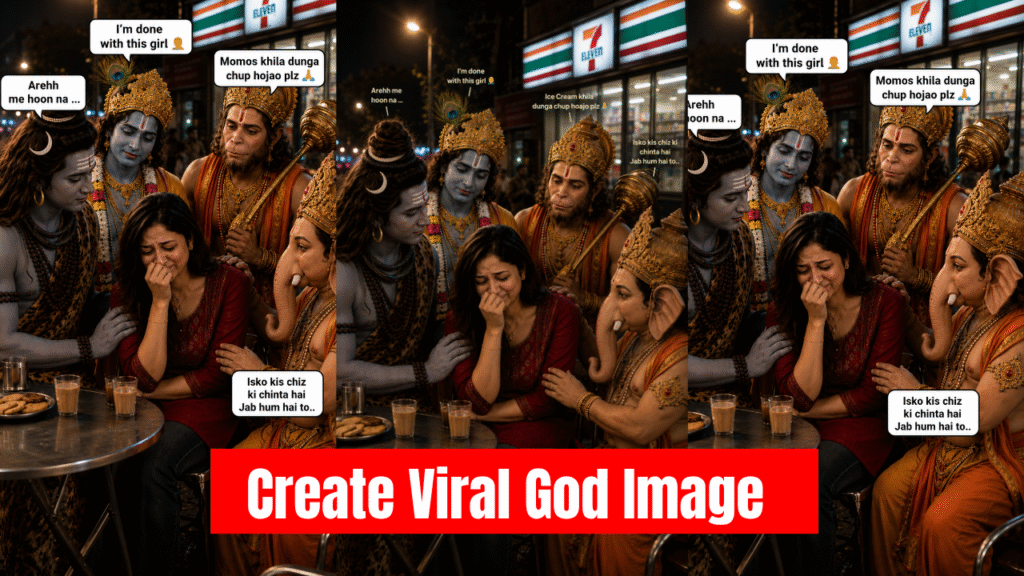
Step 1 — Generate the Main Cinematic Image
First, open ChatGPT and upload your front-facing photo.
After uploading your image, paste the prompt below.
You can also customize the prompt according to your own creativity. For example, you can add more gods, change outfits, change the location, change emotions, or create a completely different cinematic mood.
Prompt 1
“A cinematic realistic night scene at a roadside tea café outside a convenience store. A young Indian girl (use reference image women face) with long black hair and a slim body sits at a metal table crying softly, wearing a red short kurta and black jeans. Around her are realistic divine figures inspired by Lord Shiva, Krishna, Hanuman, and Ganesha in detailed traditional outfits, all looking worried and comforting her emotionally. Shiva sits closest to her with a caring expression. Warm street lights, emotional atmosphere, realistic faces, modern Indian street vibe, ultra detailed, photorealistic, emotional storytelling, soft shadows, natural tears, DSLR style, highly realistic composition.”Once you enter the prompt, ChatGPT will generate a highly realistic cinematic image for you.
Step 2 — Add Emotional Dialogue Text
Now open ChatGPT again and upload the generated image.
This time, we will add meme-style emotional dialogues to make the image more engaging and relatable for social media.
You can fully customize the dialogues according to your own ideas and emotions. Funny, emotional, caring, or relatable dialogues work best for this trend.
Prompt 2
“Add medium-sized visible dialogue text bubbles to the image in a cinematic meme style.

Write above Shiva:
‘Arehh me hoon na ...’

Write above Krishna:
‘I’m done with this girl 🤦’

Write above Hanuman:
‘Momos khila dunga chup hojao plz 🙏’

Write near Ganesha:
‘Isko kis chiz ki chinta hai… Jab hum hai to..’

Keep the text clean, readable, emotional, and visually balanced with the image. Use realistic speech bubbles and maintain the cinematic aesthetic.”
Step 3 — Post It on Instagram
Once your image is ready, upload it on Instagram Reels or Posts.
You can use any trending emotional or cinematic song from Instagram’s music library to increase reach and engagement.
These types of AI-generated emotional storytelling images perform very well because they feel relatable, emotional, and visually unique.
Final Tip
Experiment with different emotions, characters, and settings to create your own unique viral concept. The more emotional and relatable your image feels, the higher the chances of it going viral on social media.
Want to Learn AI Tools? Join my complete course [Click Below Link]
Bundle of 20 AI tools to increase your Productivity and income