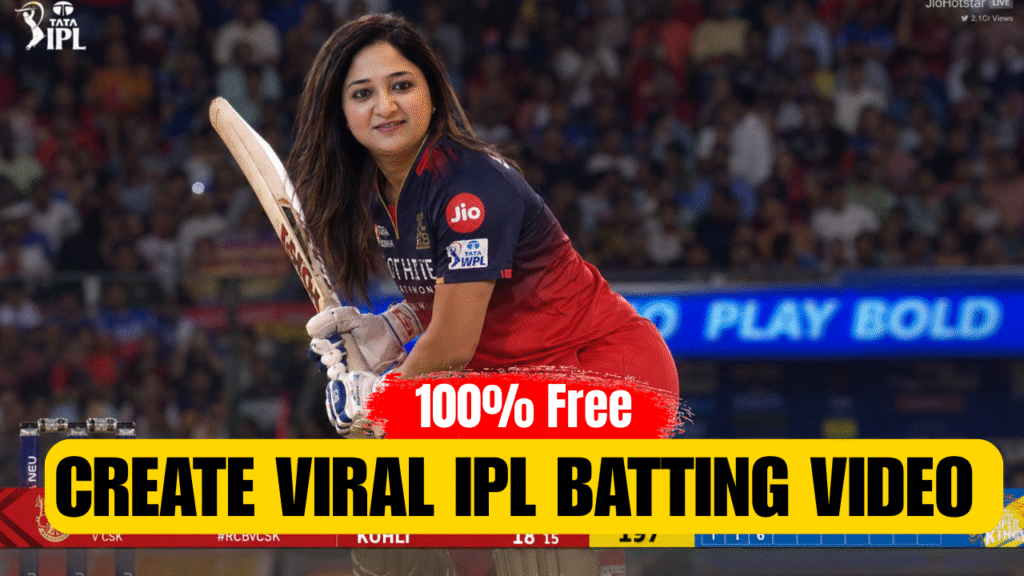
AI-generated IPL batting videos are currently trending heavily on Instagram and Reels. In this viral trend, people are creating ultra-realistic videos of themselves playing in IPL matches — batting in stadiums, hitting sixes, and even getting live commentary like real cricketers.
In this article, you’ll learn how to create your own IPL-style AI video completely free in just two simple steps.
🔥 Why This Trend Is Going Viral
- People see themselves as IPL players
- Realistic stadium + crowd atmosphere
- Live match-style scoreboard & commentary
- Highly engaging and shareable content
This type of content easily grabs attention and increases reach.
🧩 Step 1: Create Your IPL AI Image
First, you need to generate a realistic IPL-style image of yourself.
👉 Tool Required:
- ChatGPT (for AI image generation)
📌 Steps:
- Open ChatGPT
- Upload your front-facing photo
- Ask it to generate an IPL-style image using the prompt below
🧠 Image Generation Prompt:
A wide-angle, highly realistic, cinematic 8K sports broadcast screenshot of a female cricketer batting in a crowded stadium at night under bright floodlights.

Subject & Action: A South Asian woman with long, flowing dark brown hair, smiling confidently as she holds a cricket bat in a classic batting stance. She is wearing a professional red and dark navy blue RCB cricket jersey and matching red trousers, complete with white batting gloves and a golden batting pad visible at her leg.

Setting & Atmosphere: She is positioned on the pitch inside a massive, packed cricket stadium. The background features a blurred, crowded audience in the stands, creating a shallow depth of field. A bright neon blue digital boundary board reads "PLAY BOLD". The lighting is vivid and dramatic, mimicking a live IPL/WPL match broadcast.

Broadcast Overlay & Graphics: At the bottom of the frame, there is a professional, sleek digital live-match scoreboard overlay spanning the entire width. The scoreboard displays a red theme with match stats like "RCB 93-2 10.1", player names "RACHANA 45 (28)". A "TARGET 197" box in center. Bowler stats on right side.

Watermarks: Small broadcast-style logos in corners like "IPL LIVE" and view count.

Style: Photorealistic, DSLR quality, vibrant colors, authentic sports broadcast look, 16:9 aspect ratio.
✅ After this step, your IPL-style image will be ready.
🎬 Step 2: Convert Image into Viral IPL Video
Now, we’ll turn your image into a realistic AI video with motion and commentary.
👉 Tool Required:
- Search on Google: Videoino
📌 Steps:
- Open the tool and login with your Google account
- You’ll get:
- 500 free credits
- +200 bonus credits
👉 Total: 700 credits free
- Select Image to Video option
- Choose model: Seedance 2.0
- Upload your generated image
- Paste the video prompt below
🎥 Video Prompt:
0:00–0:03 — Front eye-level IPL broadcast camera angle. I intensely look at the ball while standing at the crease, dramatic floodlights, crowd roaring, realistic live scoreboard showing striker name.

0:03–0:05 — Quick close-ups: tightening grip on bat, adjusting stance, focused eyes tracking the ball, bat raised near shoulder, fast sports broadcast cuts.

0:05–0:08 — I smash the ball for a massive six, powerful bat swing, realistic cricket physics, crowd erupts cheering loudly. Commentator shouts: “WHAT A SHOT!”

0:08–0:12 — Camera follows the ball flying high through stadium lights toward boundary for six, fast pan, crowd going crazy, motion blur and camera shake.

0:12–0:15 — Camera cuts back to me calmly watching the shot with confidence, crowd roaring behind, ultra-realistic IPL broadcast feel, cinematic sports visuals.
🚀 Final Result
After processing, your video will look like:
- You playing in an IPL match
- Realistic batting shots
- Stadium crowd reactions
- Live commentary feel
- Professional broadcast visuals
Perfect for Instagram Reels, YouTube Shorts, and viral content.
💡 Pro Tips for Going Viral
- Use your real face (clear & front-facing photo)
- Keep video duration 10–15 seconds
- Add trending audio or commentary
- Post with hashtags like:
#IPL2026 #AIVideo #CricketReels #ViralReels #AITrend
🏁 Conclusion
Creating viral IPL AI videos is now easier than ever. With just an image and a simple video tool, you can turn yourself into a cricket star and ride the trending wave on social media — without spending any money.
Start creating today and go viral 🚀🔥
Want to Learn AI Tools? Join my complete course [Click Below Link]
Bundle of 20 AI tools to increase your Productivity and income