Want to create viral Ganpati AI videos for Instagram Reels, YouTube Shorts, or Facebook without shooting an actual video?
In this guide, I’ll show you how to create a beautiful Ganpati viral AI video using just a reference photo, ChatGPT, and Google Flow.
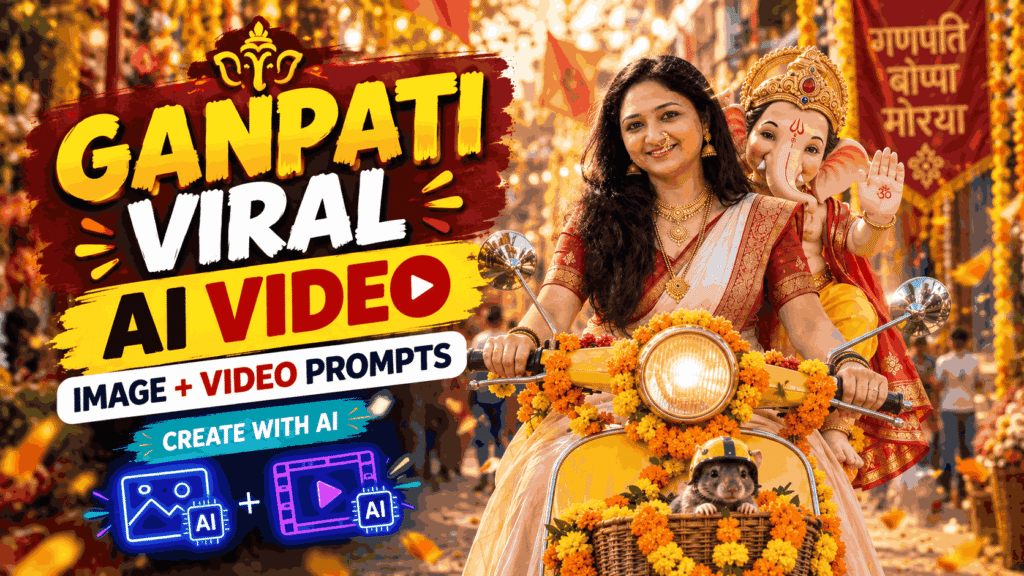
The process is simple: first, create your AI image in ChatGPT using the image prompt, then upload that generated image to Google Flow, add the video prompt, and generate your video.
We have also included multiple Ganpati image prompts below, so you can create different viral-style Ganpati images and turn them into videos.
How to Create Ganpati Viral Video with AI
Step 1: Upload Your Reference Image in ChatGPT
First, open ChatGPT and upload the photo that you want to use as your reference image.
For the best result, use a clear photo where your face is properly visible. The AI will use this image to maintain your facial identity while creating the Ganpati-themed image.
Step 2: Add the Ganpati Image Prompt
After uploading your reference image, copy and paste the Scooter Ganpati Image Prompt given below into ChatGPT.
This prompt will create a cinematic image where the woman is riding a decorated single-seat scooter, Lord Ganesha is sitting behind her, and a cute mouse is sitting in the front basket.
Make sure you use the prompt exactly as provided for the intended result.
After pasting the prompt, click Generate.
ChatGPT will create your Ganpati AI image.
Step 3: Download the Generated Image
Once the image is generated, check the result carefully.
If the face and overall composition look correct, download the generated image to your phone or computer.
This image will now be used as the starting frame for your AI video.
Step 4: Open Google Flow
Now open Google Flow, the AI video generation tool.
Upload the Ganpati image you generated in ChatGPT.
The generated image will work as the visual reference/start frame for your video.
Step 5: Add the Video Prompt
After uploading the image, copy the 10-Second Ganpati Video Prompt given below and paste it into Google Flow.
This prompt tells the AI exactly how the scene should move—for example, the woman riding the scooter, Lord Ganesha waving, the camera zooming toward Ganesha, and then moving back into a wider cinematic shot.
Step 6: Generate Your Video
After adding the image and video prompt, click Generate.
Google Flow will create the AI video based on your image and the instructions in the prompt.
You can then save the generated video and use it for your Instagram Reel, YouTube Short, or other social media content.
Create Multiple Ganpati AI Images
You don’t have to create only one image.
Below, we have provided multiple Ganpati image prompts with different concepts and scenes. You can use these prompts with your reference image to create different variations.
You can create:
- Ganpati scooter videos
- Grand Ganpati pandal images
- Ganpati aarti moments
- Floral Ganpati portraits
- Walking/candid Ganpati scenes
- Cute Ganpati “Hello” moments
- Cute flower interaction scenes
Once you have a suitable image, you can use an AI video tool such as Google Flow to turn it into a moving video.
Ganpati Scooter Image Prompt
Use the uploaded reference image as the primary reference and recreate the same scene in a square 1:1 aspect ratio. Keep the woman’s face and facial identity exactly matching the uploaded reference photo, with the same facial features, face shape, skin tone, eyes, nose, lips, hairstyle and natural expression. Do not alter or beautify her face.
Show the woman riding a single-seat vintage Vespa-style scooter decorated heavily with fresh orange and yellow marigold flowers. She is wearing a beautiful traditional Maharashtrian cream/ivory saree with a rich red and gold border and red blouse, along with authentic Maharashtrian jewellery: a traditional Maharashtrian nath, layered gold necklace/Thushi, traditional jhumka earrings, bangles and subtle traditional styling.
Lord Ganesha is seated directly behind the woman on the same scooter, not in a sidecar. He should appear slightly taller behind her, leaning naturally to one side so that his face is clearly visible beside her shoulder. He is wearing an elegant golden crown, traditional red and yellow attire and marigold garlands, smiling joyfully and giving a blessing/waving gesture.
A small cute mouse wearing a tiny yellow helmet is sitting inside the flower-decorated front basket of the scooter.
Set the scene on a beautiful Indian Ganesh Chaturthi street, filled with marigold decorations, hanging flowers, warm fairy lights, festive shops, people celebrating in the background and scattered flower petals on the road. Warm golden-hour cinematic lighting, realistic skin texture, DSLR photography, shallow depth of field, natural bokeh, highly detailed, photorealistic, festive and joyful atmosphere.
Important: Preserve the woman’s face exactly from the reference image. Do not change her identity, facial proportions, hairstyle or expression. Keep the scooter as a normal single scooter with NO sidecar. No extra people sitting on the scooter, no distorted hands, no extra limbs, no artificial-looking faces, no cartoon style, no oversized text, no unwanted logos or signatures.
10-Second Ganpati Video Prompt
Use the uploaded image as the exact visual reference. Preserve the woman’s face, appearance, saree, scooter, Lord Ganesha, mouse, decorations, and overall composition without changing identities or adding new elements.
0–3 sec: The woman smoothly rides the decorated single-seat scooter forward through the festive Ganpati street. Marigold garlands gently sway with the motion. Lord Ganesha sits safely behind her, happily enjoying the ride and gently waving toward the people around them. Natural scooter movement, realistic body motion.
3–6 sec: The camera smoothly moves closer and slowly zooms in toward Lord Ganesha’s face and upper body as he continues smiling and waving. His expression is joyful and blessing-like, with natural hand movement. Background festival lights create beautiful cinematic bokeh.
6–8 sec: Camera smoothly pulls back slightly to reveal both of them. The woman smiles and briefly turns her head back toward Ganesha while continuing to drive safely; Ganesha looks at her happily. They appear to share a warm, joyful moment.
8–10 sec: Camera transitions into a smooth front-tracking shot as the scooter continues moving through the lively Ganpati celebration. Both are enjoying the ride, marigold flowers gently moving in the breeze, people and lights passing naturally in the background.
Style: photorealistic, cinematic Indian festival atmosphere, smooth realistic motion, warm golden lighting, natural facial expressions, realistic scooter physics, subtle camera movement, shallow depth of field, high detail, 9:16 vertical, 10 seconds, no face distortion, no character changes, no extra limbs, no text or logos appearing.
Additional Ganpati Image Prompts
1. Ganpati Pandal Look
Use the uploaded woman’s photo as the exact identity reference. Keep her face highly recognizable and preserve her exact facial features, face shape, skin tone, eyes, nose, lips, smile, and natural appearance. Do not alter or beautify her face.
Create a stunning 1:1 square photorealistic portrait of the woman standing beside a massive, majestic Lord Ganesha idol inside a grand Ganpati pandal. She is wearing an elegant cream/ivory Maharashtrian saree with a deep red and gold border, authentic Maharashtrian nath, traditional gold jhumka earrings, layered gold necklaces, mangalsutra and traditional bangles.
The Ganpati idol should be very large and beautifully decorated with an elaborate golden crown, traditional ornaments, red and yellow royal clothing, and thousands of fresh marigold flowers. The pandal should look luxurious and grand, with beautiful golden arches, floral decorations, warm hanging lights, diyas and subtle festive crowd in the distant background.
The woman stands slightly beside Ganesha, smiling naturally at the camera, one hand gently folded in a respectful namaste. Grand scale, divine atmosphere, cinematic golden lighting, realistic DSLR photography, natural skin texture, beautiful depth of field, premium Indian festival photography.
No scooter, no vehicle, no mouse, no extra limbs, no distorted face, no cartoon look, no artificial skin, no watermark, no unwanted text. Aspect ratio 1:1.
2. Ganpati Aarti Emotional Look
Use the uploaded woman’s photograph as the exact face and identity reference. Keep her face completely recognizable and unchanged.
Create a beautiful 1:1 square realistic photograph of the woman sitting respectfully in front of a beautifully decorated Lord Ganesha idol during Ganesh Chaturthi. She is wearing a traditional cream saree with red and golden Maharashtrian border, authentic Maharashtrian nath, gold earrings, traditional necklace, bangles and elegant festive makeup.
She is holding a large traditional brass aarti thali with glowing diyas, gently performing aarti in front of Lord Ganesha. The Ganpati idol is beautifully decorated with fresh orange and yellow marigold garlands, golden crown and traditional ornaments.
Add glowing diyas around the idol, flower petals, incense smoke, warm golden light and soft background bokeh. Capture a peaceful devotional moment with a natural gentle smile on the woman’s face.
Photorealistic, emotional, cinematic Indian festival photography, warm golden tones, realistic skin texture, natural lighting, shallow depth of field, highly detailed, elegant and spiritual atmosphere.
No scooter, no vehicle, no mouse, no artificial face, no face alteration, no cartoon effect, no extra fingers, no text, no watermark. 1:1 square.
3. Flowers के बीच Ganpati के साथ Portrait
Use the uploaded woman’s image as the exact identity reference. Preserve her face, facial proportions, skin tone, eyes, nose, lips, hair and natural expression exactly.
Create a gorgeous 1:1 square premium portrait of the woman sitting beside a beautifully decorated Lord Ganesha idol in a luxurious floral setup. She wears an elegant ivory Maharashtrian saree with a rich red-gold border and matching blouse, traditional Maharashtrian nath, gold jhumka earrings, layered necklaces and bangles.
Surround both the woman and Ganesha with abundant fresh orange marigolds, yellow flowers, white flowers and red roses, creating a beautiful floral frame around them. Lord Ganesha has a magnificent golden crown, traditional jewelry and a peaceful blessing pose.
The woman sits naturally beside Ganesha, slightly leaning toward him, smiling warmly toward the camera. Add soft warm fairy lights and beautiful golden bokeh in the background.
Luxury Indian festive photoshoot, photorealistic DSLR, cinematic composition, soft natural skin texture, realistic details, warm light, elegant Maharashtrian aesthetic, emotional devotional feeling, Instagram-worthy photograph.
No scooter, no vehicle, no mouse, no crowd in foreground, no face change, no cartoon, no plastic skin, no extra fingers, no text or watermark. Aspect ratio 1:1.
4. Ganpati के साथ Walking / Candid Look
Use the uploaded woman’s photograph as the exact identity reference and preserve her face and identity without any alteration.
Create a 1:1 square photorealistic cinematic candid photograph of the woman walking slowly beside a beautifully decorated Lord Ganesha idol during a grand Ganesh Chaturthi celebration. She is dressed in an elegant cream Maharashtrian saree with red and gold border, authentic Maharashtrian nath, traditional gold earrings, necklaces and bangles.
The large Ganesha idol is beautifully decorated with marigold garlands, golden ornaments, a magnificent crown and red-gold clothing. The woman is looking toward Ganesha with a soft happy smile, creating a natural emotional connection between them.
Behind them is a beautiful festive street/pandal filled with marigold decorations, glowing diyas, warm fairy lights and soft blurred devotees. Some flower petals are gently falling through the air.
Candid Indian festival photography, photorealistic, cinematic golden-hour lighting, natural expressions, realistic movement, shallow depth of field, beautiful bokeh, premium DSLR look, authentic Maharashtrian festive atmosphere.
No scooter, no vehicle, no mouse, no face alteration, no artificial beauty filter, no cartoon style, no extra limbs or fingers, no text, no watermark. 1:1 square composition.
5. Cute “Hello” Moment with Ganpati Bappa
Use the uploaded woman’s photo as the exact identity reference. Preserve her face, facial proportions, eyes, nose, lips, skin tone, hair and natural expression exactly. Do not change her identity.
Create a 1:1 square photorealistic, adorable and cinematic Ganesh Chaturthi photograph. The woman is wearing an elegant cream/ivory Maharashtrian saree with a rich red-gold border, authentic Maharashtrian nath, beautiful gold jhumka earrings, layered necklaces and traditional bangles.
Show the woman standing and walking beside a very cute, charming baby-like Lord Ganesha, both happily waving “hello” toward the camera at the same time. Ganesha should have an irresistibly cute innocent expression, big expressive joyful eyes, a small playful smile, adorable little hands, a beautiful golden crown and traditional yellow-red festive outfit.
The woman looks at Ganesha with a playful smile while Ganesha looks toward the camera and waves. Capture the moment like a spontaneous candid photograph, as if they are greeting the viewer together.
Surround them with beautiful marigold flowers, colorful festive decorations, glowing diyas and soft golden fairy-light bokeh. Add a few flower petals floating gently in the air.
Cute, wholesome, joyful, heartwarming, viral-style Indian festive photography, realistic DSLR quality, natural skin texture, cinematic lighting, shallow depth of field, expressive interaction, dynamic candid pose.
No sitting pose, no scooter, no vehicle, no mouse, no static studio pose, no extra people in foreground, no face change, no cartoonish woman, no distorted hands, no extra fingers, no text, no watermark. 1:1 square.
6. Cute Flower Interaction with Ganpati Bappa
Use the uploaded woman’s image as the exact identity reference. Keep her face completely recognizable and preserve her exact facial features, proportions, skin tone, eyes, nose, lips, hair and natural appearance.
Create a 1:1 square ultra-realistic cinematic candid photograph of the woman in a beautiful traditional Maharashtrian cream saree with red and gold border, authentic Maharashtrian nath, gold earrings, layered necklaces and bangles.
The woman is walking through a beautifully decorated Ganpati festival pandal, while an adorable cute Lord Ganesha walks playfully beside her. Ganesha has a sweet innocent expression, expressive sparkling eyes, a tiny joyful smile, ornate golden crown, traditional jewelry and a bright yellow-red outfit.
Ganesha playfully holds out a fresh marigold flower toward the woman, and she reaches toward him with a surprised, happy smile. Capture them in the middle of this adorable interaction—not posing for the camera. Ganesha should look playful and cute, while the woman looks genuinely delighted.
Add marigold flower arches, colorful Ganpati decorations, glowing diyas, soft fairy lights and beautiful golden bokeh in the background. A few flower petals gently fall around them, creating a magical festive atmosphere.
Wholesome cute chemistry, playful candid moment, emotional and heartwarming, premium Indian festival photography, photorealistic DSLR, natural expressions, realistic skin texture, cinematic golden lighting, beautiful depth of field, highly detailed, Instagram-worthy viral aesthetic.
No sitting, no scooter, no vehicle, no mouse, no formal posing, no static portrait, no face alteration, no artificial skin, no cartoon woman, no distorted anatomy, no extra fingers, no text, no watermark. 1:1 square.
Final Tip
For the best workflow, first create multiple Ganpati images in ChatGPT using the image prompts above. Select your favorite image and then use it in an AI video generator with the video prompt.
This way, you can create multiple variations of Ganpati viral AI videos from the same reference photo—without recording a real video.
So, upload your reference image, generate your favorite Ganpati image, download it, upload it to Google Flow, paste the video prompt, and generate your 10-second cinematic Ganpati AI video.