Viral IPL Broadcast Trend– The latest AI trend on Instagram Reels and YouTube Shorts is all about creating ultra-realistic IPL crowd-cam moments that look exactly like live TV broadcasts. Using tools like Chatgpt and Kie AI, creators are turning normal photos into cinematic cricket-stadium reactions that feel straight out of a real IPL telecast.
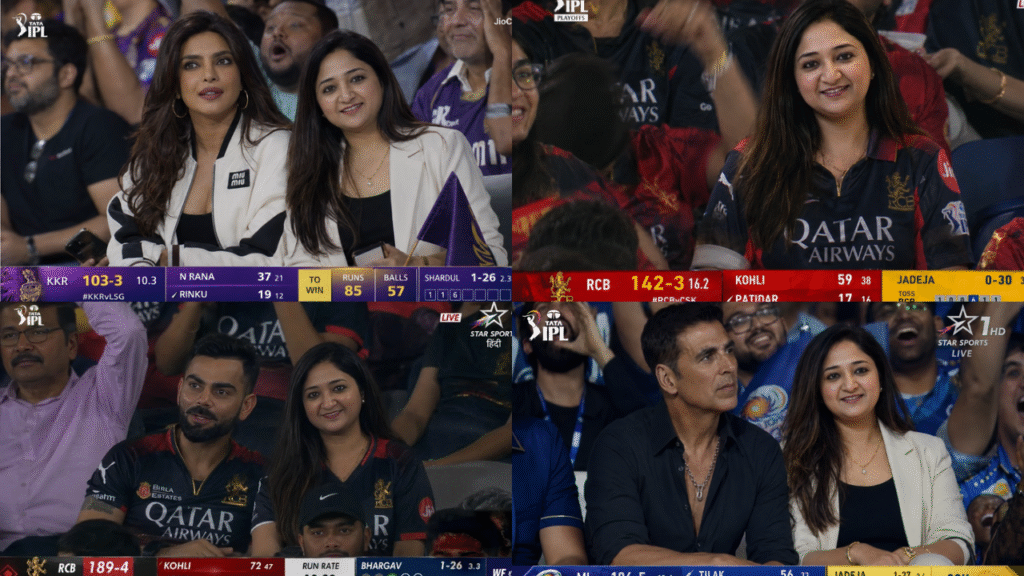
The concept is simple:
You upload a normal photo, generate an IPL-style broadcast screenshot, animate it into a realistic crowd reaction video, and post it on social media.
Step 1 — Generate an IPL Broadcast Image
Start by opening ChatGPT and upload a clear natural-looking photo.
For best results:
- Use a casual smiling image
- Avoid heavy studio lighting
- Use realistic expressions
- Keep clothing natural and modern
Then paste the following AI image prompt:
Ultra-realistic IPL live broadcast crowd-cam shot inside a packed cricket stadium at night, featuring the reference image woman seated beside Priyanka Chopra in the VIP audience section during a Kolkata Knight Riders vs Lucknow Super Giants match.

The reference image woman is wearing modern luxury streetwear inspired by high-end celebrity airport fashion — elegant neutral-toned outfit, premium styling, subtle jewelry, confident natural expression. Priyanka Chopra is styled in glamorous designer stadium fashion with voluminous hair, cinematic makeup, hoop earrings, and a stylish white-black luxury jacket, matching her iconic public appearance.

Front-facing telephoto sports-broadcast angle, both women naturally seated side-by-side like they were unexpectedly captured during a live IPL telecast, not posing for the camera. The surrounding crowd is filled with excited spectators in KKR jerseys, emotional fan reactions, cheering faces, waving flags, and blurred stadium seating.

Authentic IPL live-stream presentation with realistic sports broadcast overlays: Tata IPL logo top-left, JioCinema LIVE watermark top-right, purple-and-yellow scoreboard ticker at bottom showing “KKR 103-3”, over count, batsman stats, Hindi-English commentary graphics, player stats UI, and subtle live telecast graphics.

Cinematic sports-documentary aesthetic with handheld camera energy, realistic broadcast micro-shake, shallow depth of field, dramatic stadium floodlights, atmospheric haze, ultra-realistic skin textures, warm cinematic color grading, high contrast night-match lighting, detailed facial realism, subtle film grain, viral crowd-cam energy. Shot on 150mm live sports broadcast lens at f/2.8 with authentic televised cricket atmosphere and realistic broadcast compression artifacts.
After generation:
- Save multiple versions
- Pick the most natural expression
- Choose the image with the best TV-broadcast realism
Step 2 — Animate the Image Using Google Flow
Now open:
Kie AI
Then follow this process:
Search Grok
Inside Grok select Image to Video Option
Upload Your IPL Image
Upload the AI-generated IPL broadcast image created in Step 1.
Paste the Animation Prompt
Copy and paste the cinematic broadcast animation prompt below.
Click Generate
Press the Generate Video button.
Kie AI will create a realistic IPL crowd-cam animation based on your image and prompt.
Live sports broadcast video, 4–5s, 16:9, 1080p. The person from the attached reference image is seated beside [CELEBRITY NAME] in the VIP audience section of a packed IPL cricket stadium during a live night match. [CELEBRITY NAME] wears a stylish luxury casual outfit matching their public personality and fashion style, while the reference person wears modern premium streetwear. Both sit naturally among the crowd with calm, composed expressions, initially watching the cricket match before briefly noticing the live stadium camera.

Subtle realistic movements only: both subjects gently turn their heads toward the broadcast camera, give a soft natural smile, and casually wave once toward the lens with minimal movement. Facial expressions remain subtle and realistic — no exaggerated excitement, loud reactions, or dramatic gestures. The moment should feel candid and authentic, like a real IPL live broadcast crowd-cam capturing two calm VIP spectators during a tense match moment.

Shot using a 150mm telephoto live sports broadcast lens with cinematic shallow depth of field, smooth stadium bokeh, realistic floodlight illumination, energetic Indian crowd atmosphere, blue IPL jerseys, premium VIP seating area, realistic skin textures, subtle handheld broadcast micro-shake stabilization, cinematic sports framing, and natural ambient lighting. Include faint IPL-style scoreboard graphics, Hindi-English sports ticker UI, player stats overlays, and subtle live broadcast elements in the corner. Ultra-realistic live sports broadcast quality, natural motion, no cuts.
Want to Learn AI Tools? Join my complete course [Click Below Link]
Bundle of 20 AI tools to increase your Productivity and income
Step 3 — Export the Final Video
For best results:
- Export in 1080p
- Use 16:9 ratio
- Choose 24fps or 30fps
Then upload to:
Tips to Make the Video Look More Real
✅ Use natural smiling photos
✅ Add slight motion blur and TV grain
✅ Keep expressions subtle and realistic
✅ Use “live broadcast” style wording in prompts
✅ Add realistic crowd ambience and commentary
The more authentic the broadcast looks, the more viral potential the video usually gets on short-form platforms.