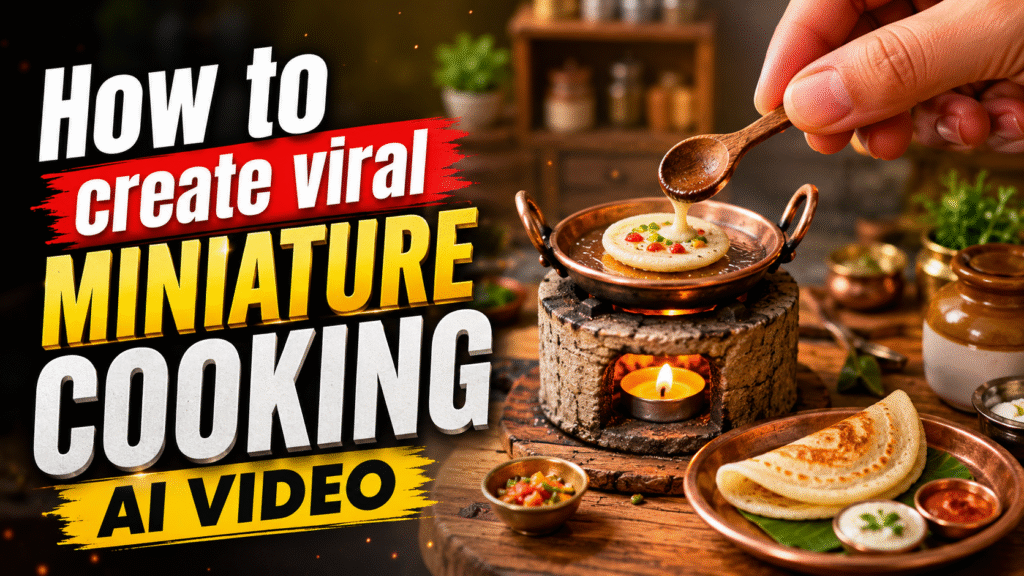
Miniature cooking videos have recently become a huge trend on social media. These videos show tiny kitchens, miniature utensils, small stoves, and food being prepared in incredibly detailed settings. The combination of AI-generated visuals, realistic food textures, and satisfying ASMR-style cooking sounds makes them highly engaging and shareable.
Because of this, many creators are using miniature cooking AI videos to attract millions of views, gain followers, and grow their social media presence.
In this guide, we’ll show you the complete process of creating your own AI-generated miniature cooking video using Google Flow.
What Is Miniature Cooking?
Miniature cooking is a style of content where food is prepared using extremely small cooking equipment and ingredients. Instead of a normal kitchen, everything is designed at a tiny scale—from the stove and pan to the utensils and serving plates.
When AI is used to create these scenes, you can make the entire cooking process look incredibly realistic, including tiny oil drops, sizzling food, cooking textures, garnishes, and even the movement of miniature utensils.
How to Create a Miniature Cooking AI Video
The process is quite simple. You don’t need to manually create the miniature kitchen or animate every cooking action.
Step 1: Open Google Flow
First, open Google Flow, Google’s AI filmmaking and video-generation platform.
Once you’re inside Flow, start a new generation and look for the Omni Flash option.
Step 2: Select Omni Flash
Select Omni Flash as your generation model. This will be used to create the miniature cooking video from your text prompt.
Step 3: Add the Miniature Cooking Prompt
Now paste the following prompt into the prompt box.
You can change the [FOOD_ITEM] section according to the dish you want to create—for example, dosa, pizza, pancakes, noodles, samosa, or any other food.
Miniature Cooking AI Video Prompt
Macro cinematic, 8k resolution, ultra-realistic video of a miniature ASMR cooking sequence. [SCENE SETUP]: A clean, modern kitchen background with a shallow depth of field. In the foreground, a tiny, rustic stone stove sits on a wooden board, heated by a single lit tea-light candle inside. On top of the stove is a miniature, polished copper tawa (pan) with dual handles. [ACTION SEQUENCE]: 1. A human hand uses a tiny glass dropper to place a few droplets of cooking oil onto the heated pan, followed by wiping it smoothly with a tiny piece of folded paper towel. 2. The hand uses a miniature wooden ladle to pour a small dollop of [FOOD_ITEM] batter/ingredients onto the center of the pan. The batter sizzles delicately upon contact. 3. The ingredient is meticulously spread out, cooked until golden brown textures appear, and topped with microscopic garnishes or fillings specific to [FOOD_ITEM]. 4. Using a tiny metal spatula, the cooked [FOOD_ITEM] is carefully folded, lifted, and plated onto a miniature matching serving dish alongside microscopic bowls of accompanying sauces or condiments. [LIGHTING & AESTHETICS]: Warm, cinematic lighting, sharp focus on the textures of the food and tiny utensils, rich golden hour tones, and high-fidelity visual rendering capturing the precise, delicate physics of miniature cooking. Save this prompt for your next AI video and comment what miniature dish I should generate next!
Step 4: Customize the Dish
The best part is that you don’t have to use the same dish every time.
Simply replace [FOOD_ITEM] with the food you want to generate.
For example:
- Miniature Dosa
- Miniature Pizza
- Miniature Pancakes
- Miniature Noodles
- Miniature Samosa
- Miniature Burger
- Miniature Biryani
This allows you to create an entire series of miniature cooking videos around different dishes.
Step 5: Click Build & Generate
After adding your prompt and choosing your dish, click Build & Generate.
Google Flow will process the prompt and generate your miniature cooking video. Depending on the generation, you may get a highly detailed cinematic scene showing the complete cooking process—from adding oil to cooking, garnishing, folding, and finally plating the food.
Tips to Make Your Videos More Engaging
To make your miniature cooking videos more appealing, focus on detail and realism. Close-up macro shots, shallow depth of field, realistic food textures, tiny utensils, warm lighting, and satisfying cooking actions can make the video much more visually engaging.
You can also experiment with different dishes and create a recurring series such as “Miniature Cooking – Episode 1, Episode 2, Episode 3…”. This can encourage viewers to follow your account to see what dish you generate next.
Final Thoughts
Creating miniature cooking AI videos doesn’t require complicated editing or animation skills. With the right prompt and an AI video-generation tool like Google Flow, you can create highly detailed miniature cooking scenes with just a few steps.
The key is to experiment with different dishes, improve your prompts, and create visually satisfying videos that make people want to watch until the end.
So, choose your favorite dish, replace [FOOD_ITEM] in the prompt, select Omni Flash, click Build & Generate, and start creating your own miniature cooking AI videos.