Viral Face Off Effect Prompts – The Face-Off effect is a trending AI visual where a person removes their own face like a mask—revealing a natural version underneath while holding the makeup-covered face in their hand.
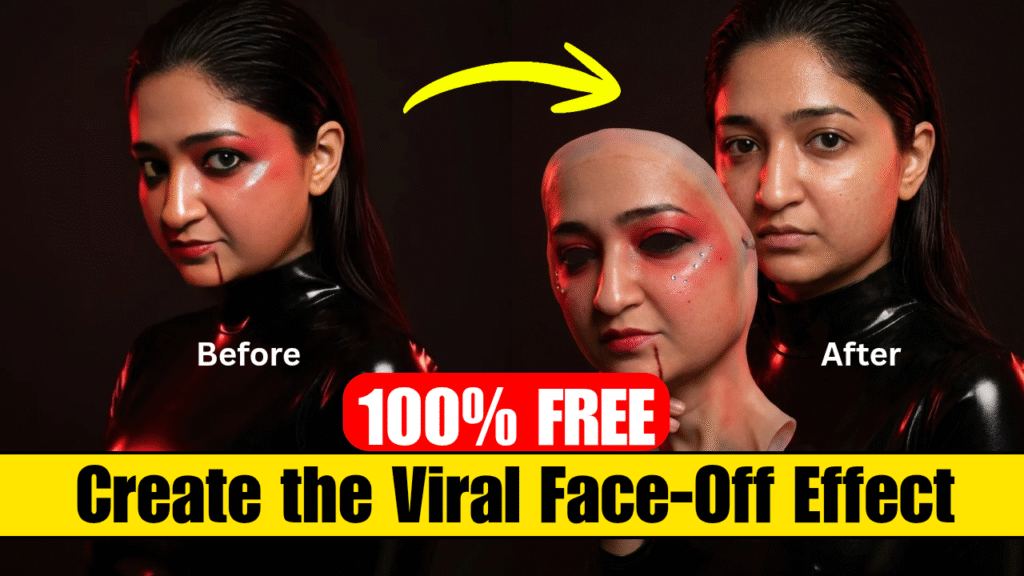
This guide will show you exactly how to create it using Google Gemini + Google Flow, along with the exact prompts you need.
 Step 1: Generate the Face-Off Image (Google Gemini)
First, you need to create the final image where the face is removed and held in hand.
 Instructions:
- Open Google Gemini
- Upload your front-facing photo
Paste the prompt below 
 IMAGE PROMPT (Copy & Use)
Use the original image of the person as the base. Keep the same person, background, lighting, and composition. The person’s face is now completely bare:
- no makeup
- natural skin texture visible (pores, slight variation)
- do not smooth or beautify the skin
The facial features must remain exactly the same:
- same eyes, nose, lips, and proportions
- no reshaping or enhancement
- the person must stay fully recognisable
Add their own hand holding a removed face-and-neck mask beside their face.
The mask should:
- contain the full makeup look from the original image
- match the makeup exactly
- include all details (colors, rhinestones, gloss, etc.)
The mask must look like realistic ultra-thin silicone:
- visible thin edges and natural curvature
- soft, flexible, slightly translucent edges
- subtle bending and edge curling
- realistic skin texture

Position the mask slightly in front of the face, clearly separated, angled toward the camera. The neck portion of the mask should be visible and hang naturally. Add subtle shadow from the mask onto the face for realism.

Lighting must remain consistent.
Final result: the same person, bare-faced, holding a realistic silicone mask with their makeup on it.
 Step 2: Create the Animation (Google Flow)
Now convert your images into a cinematic video.
Setup:
- Open Google Flow
- Choose video generation
 Frame Setup:
Frame 1: Original image (with makeup)
Frame 2: Generated image (mask removed)
 Step 3: VIDEO PROMPT (Animation)
Paste this prompt in Flow
 VIDEO PROMPT (Copy & Use)
Use original image as start frame and generated image as end frame.
Scene:
- natural setting
- mid-torso shot
- subtle micro-movements
Camera:
- slow push-in (zoom)
- brief hold before action
Action:
- natural blink
- person lifts hand
- peels mask from forehead downward
Physics of mask:
- stretches elastically
- sticks slightly before release
- edges curl naturally
- strongest tension at cheeks, jaw, neck
Peel flow:
- top → bottom
- neck stretches slightly before release
Result:
- makeup stays on mask
- real face underneath (no morphing)
- subtle micro-smile
Ending:
- mask held beside face
- soft bending motion
- consistent lighting
- final frame hold ~1 second Step 4: Generate Your Video
- Click Generate
- Wait for rendering
Your Face-Off cinematic video will be ready
 Pro Tips
- Use a high-quality front-facing image
- Keep lighting soft and natural
- Avoid heavy filters in the original image
- Prompts should stay detailed and specific (this is key
 )
)
 Conclusion
With the right prompts and setup, the Face-Off effect can look incredibly realistic and cinematic. This trend is perfect for creating viral short-form content and grabbing attention instantly.
Want to Learn AI Tools? Join my complete course [Click Below Link]
Bundle of 20 AI tools to increase your Productivity and income